Zia Solutions
Zia Solutions serves as a centralized knowledge repository where you can provide organization-specific information, instructions, playbooks, runbooks, and standard operating procedures (SOPs) for Zia Agents. This knowledge helps agents understand your operational practices, investigate incidents, and recommend appropriate resolutions.
In an agentic AI system, a knowledge repository provides agents with the information and context required to perform tasks. Zia Solutions fulfills this purpose by making your organization's operational knowledge available to agents when handling relevant scenarios.
What can you include in Zia Solutions?
Zia Solutions can contain different types of operational knowledge, based on your organization's requirements.
- Knowledge documents: Reference information about your infrastructure, applications, configurations, and operational processes that helps agents understand your environment.
- Instructions: Specific guidelines that define how agents should approach tasks, investigate issues, or provide recommendations.
- Playbooks: Structured procedures that describe how to handle operational scenarios, including decision-making steps, responsibilities, and escalation paths.
- Runbooks: Step-by-step technical procedures for troubleshooting and resolving known issues, including commands, scripts, and verification steps.
- SOPs: Documented processes that define how routine operational activities should be performed consistently.
These resources help agents use your organization's knowledge to provide relevant guidance during incident investigation and response.
How Zia Solutions works
Zia Solutions provides a knowledge source that Zia Agents can use when performing relevant tasks.
- Create a Solution: Define a Solution with a name and description based on your operational requirements.
- Add knowledge: Upload documents containing instructions, playbooks, runbooks, SOPs, or other relevant information.
- Associate with an agent: Link the Solution to a Zia Agent during agent configuration.
- Apply the knowledge: The agent refers to the information in the Solution to understand procedures and requirements, investigate issues, and recommend appropriate actions.
- Support automation: When a Solution contains suitable remediation instructions, Zia can generate IT automation recommendations for review.
This allows organizations to provide agents with relevant operational context without repeating instructions for every investigation.
Benefits
- Centralize operational knowledge: Maintain organization-specific instructions, troubleshooting procedures, and reference information in a common repository.
- Provide contextual guidance: Help agents understand your infrastructure and operational practices when handling incidents.
- Improve troubleshooting consistency: Enable agents to refer to established procedures when investigating and resolving issues.
- Preserve institutional knowledge: Make documented expertise accessible to agents, reducing dependency on individual engineers.
- Support knowledge-driven automation: Use remediation instructions to generate IT automation recommendations.
- Simplify knowledge management: Organize operational information into solutions based on different operational requirements and use cases.
Use cases
- Infrastructure knowledge: Provide information about application dependencies, system configurations, and operational practices to help agents understand your IT environment.
- Incident investigation: Upload troubleshooting guides to help agents investigate issues such as high CPU utilization or database performance issues.
- Incident response: Provide playbooks to outline investigation steps, validation procedures, and corrective actions for specific incidents.
- Service recovery: Add runbooks to describe how to restore failed services and verify recovery.
- Incident escalation: Define escalation procedures and responsibilities to help agents determine when human intervention is required.
How to configure a Zia Solution
To configure a Zia Solution, follow these steps:
- Log in to Site24x7.
- Navigate to Admin > Zia Settings > Zia Solution > Add Solution.
- In the Add Solution form, provide the following details:
- Solution: Enter a name that clearly identifies the purpose of the Solution.
- Description: Describe the knowledge or operational requirements covered by the Solution.
- Upload Files: Click Choose File to upload documents containing knowledge, instructions, playbooks, runbooks, or SOPs.
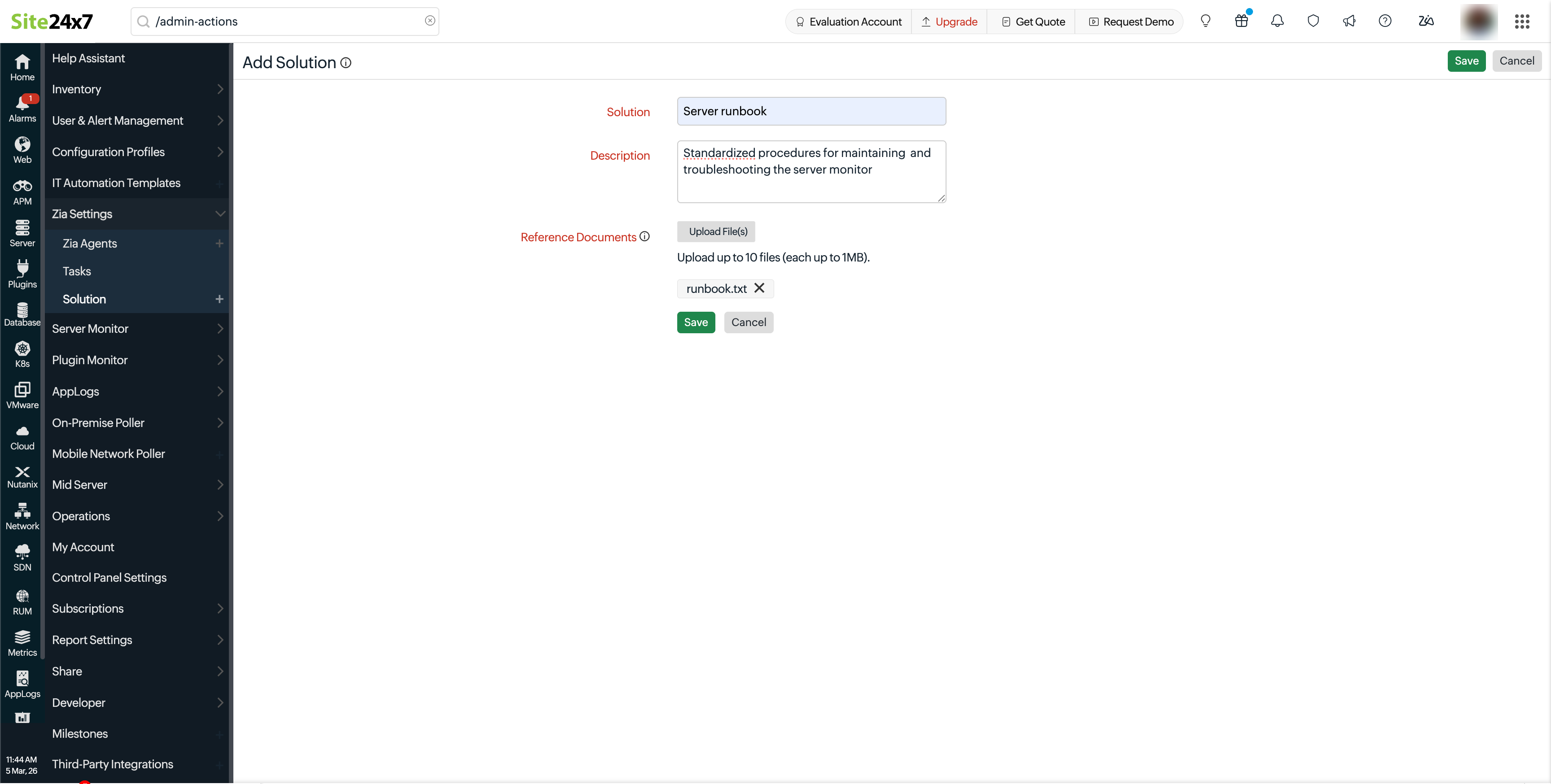
- Click Save.
- You can upload a maximum of 10 files per Solution.
- Only .txt and .md files are supported.
- Each file can be up to 1 MB.
- Uploaded files serve as reference material for Zia Agents.
- Once uploaded, files cannot be edited or revisited through the existing upload interface.
Best practices
Follow these recommendations to help agents use your provided knowledge effectively.
- Organize knowledge by purpose: Create Solutions for specific applications, operational scenarios, or troubleshooting requirements.
- Provide clear information: Use descriptive headings and structured formatting so agents can identify relevant instructions.
- Include operational context: Document relevant system details, dependencies, and conditions that agents should consider.
- Define procedures clearly: When providing playbooks or runbooks, include the required steps, expected outcomes, and validation requirements.
- Specify escalation conditions: Explain when an issue requires human intervention or additional investigation.
- Keep knowledge current: Review and update Solutions whenever infrastructure configurations, operational procedures, or requirements change.